


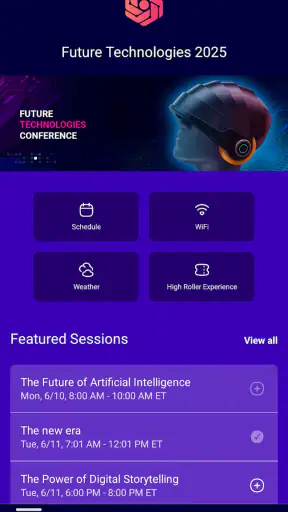
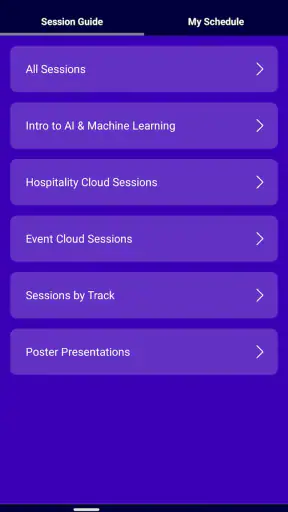
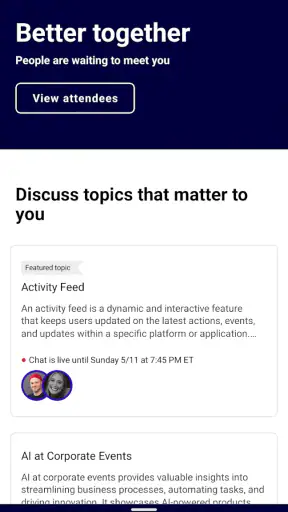
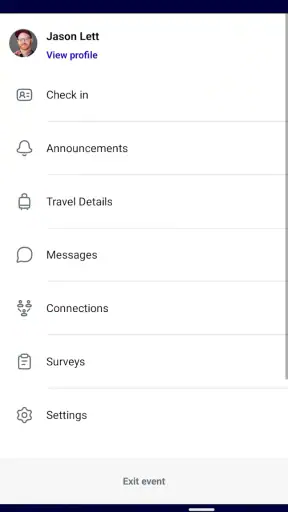
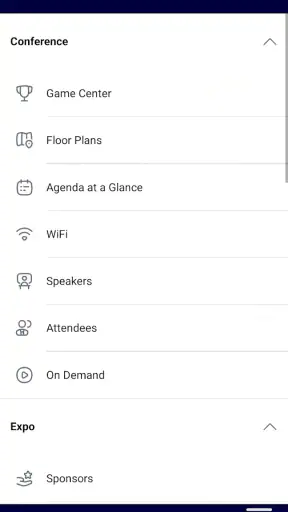
Cvent Events is the kind of business app that makes sense only when you are actually attending an event built with Cvent. I found it much more useful as a focused event companion than as a general-purpose planning tool. Instead of trying to replace every calendar, messaging, or networking app on my phone, it puts the event experience in one place: the schedule, practical information, and the details I need while moving between sessions. That narrow purpose is also its main strength.
The app is developed by Cvent and is available free of charge. It belongs to the business category, carries a Teen content rating, and has reached over a million installs. Its average rating is 4.7 from around 5,100 ratings, with roughly 276 written reviews, so there is clear evidence that many attendees find it worthwhile. My recommendation is straightforward: if the organizer of your conference, meeting, or corporate event uses Cvent, installing this app is usually sensible. If you are looking for a universal event planner for personal gatherings, it is probably the wrong download.
How Cvent Events feels in everyday use
The first thing I noticed is that the app is event-dependent. It is not an empty dashboard that becomes useful through hours of setup. Its value appears when the relevant event has been made available to you. Once that happens, the app works as a mobile guide, helping you check what is happening, where you need to be, and what information the organizer has chosen to publish.
That distinction matters because expectations can easily become confused. A person opening it without an associated event may wonder why it does not behave like a normal calendar or task manager. The app is not designed to help you create a birthday party from scratch or coordinate a casual dinner with friends. It is designed around organized business events, where the host controls the content and attendees consume it on their phones.
In a realistic workday, I would use it before leaving for a conference to review the program and identify sessions worth attending. During the event, I would open it between meetings rather than search through email threads or printed pages. If the schedule changes, the app gives me a more practical place to look than an old screenshot saved in my photo library. That simple workflow is where the product earns its place.
The best way to think about Cvent Events is as a live reference point for an organized event, not as a complete business social network. That framing prevents disappointment and makes its useful qualities easier to recognize.
A cleaner alternative to scattered event information
Business events often spread information across too many channels. An invitation arrives by email, the agenda appears in a document, room details are printed on a badge, and last-minute notices are sent through another service. Cvent Events can reduce that fragmentation when the organizer has prepared the event properly. I appreciate not having to switch between a browser tab, a PDF, and a message thread just to work out where I should go next.
The advantage is especially clear for multi-session conferences. A long program can be difficult to scan on a desktop page, while a phone-based guide is available while standing in a lobby or walking between rooms. The app is therefore less about deep reading and more about quick decisions: which session is next, what should I attend, and where should I go?
There is a trade-off, though. The quality of the experience depends heavily on the event setup. Cvent provides the container, but the organizer determines how complete, current, and useful the content is. A well-prepared event can feel organized; a poorly maintained one can still leave you checking email for answers. I would not judge every event experience solely by the app, but I would judge how well the app handles the information it receives.
Useful habits before the event begins
I recommend opening the app well before the first session instead of waiting until you are already at the venue. That gives you time to understand the event layout and spot clashes in your plans. Even if you intend to attend only a few sessions, reviewing the whole schedule helps reveal whether a change in room or timing affects your route.
A practical habit is to create a personal shortlist mentally or through whatever event-specific planning tools are available in the experience, rather than relying on memory. Conference programs are tiring to manage when every choice is made at the last minute. I also suggest checking the app again shortly before leaving for a session. A schedule that looked stable in the morning may be different later, and an old screenshot will not reflect those adjustments.
Another less obvious benefit is reducing cognitive load. At a busy event, the problem is rarely a lack of information; it is having too much of it at once. I found the app most valuable when I used it selectively, checking only the next decision instead of repeatedly browsing every available item. That turns it from a digital brochure into a small navigation aid for the day.
What the current version suggests about its direction
The current version is 2.3.0, shown with the build identifier 2.3.0-3481488. I treat that as useful context rather than a promise of a particular feature set. It indicates that the app is being maintained as a current product, but a version number alone does not tell me whether every event will expose the same tools or whether a particular organizer has enabled every available option.
The app was released on March 26, 2020, and its continued presence alongside a large install base suggests that Cvent Events has remained relevant to organizations running structured gatherings. For existing users, the important point is not the number itself but the product’s role: it has become a familiar mobile doorway into Cvent-powered events rather than a one-off companion for a single occasion.
When I evaluate an app like this, I separate confirmed product facts from expectations. A newer version can improve reliability, navigation, or compatibility, but I would not assume that an update automatically changes the content of an event. The organizer still controls much of what attendees see. That means a current installation is important, yet it cannot compensate for incomplete event information.
What changed for people already using it
For an existing attendee, the main benefit of staying current is continuity. A maintained app is more reassuring than an abandoned event guide, particularly when you depend on it during a packed schedule. I would update before traveling, not while standing outside the first session, because an event app is most useful when it is ready before the pressure starts.
There is also a practical distinction between updating the app and receiving updated event content. Installing the latest version keeps the application itself current, while event details may depend on the organizer’s publishing decisions and the connection available at the time. Users should therefore avoid assuming that an update alone guarantees a newly revised agenda. I would still open the event and check its content after updating.
The app’s large audience and strong average rating make it easier for me to recommend testing it before an important event. That does not mean every user will have the same experience. A participant attending a small meeting may find a dedicated email perfectly adequate, while someone visiting a large conference may appreciate having the program in a purpose-built mobile guide.
Where it works better than ordinary alternatives
The usual alternative is a mixture of email, a mobile browser, calendar entries, and paper notes. That combination can work, but it puts the burden on the attendee to assemble a personal system. Cvent Events is better when the event has many moving parts and the organizer has placed the relevant information inside the app.
Compared with a generic calendar, it is more event-specific. A calendar can remind me that I have a session at a certain time, but it does not necessarily provide the surrounding event context. Compared with a PDF agenda, the app is easier to consult while walking and less likely to leave me searching through a long document. Compared with a chat group, it avoids burying essential information beneath unrelated conversation.
Still, each alternative has a place. A calendar remains better for combining the conference with flights, hotel check-in, and ordinary work appointments. Email is often better for official receipts, registration messages, or personal correspondence. A browser may be preferable on a laptop when I want to compare several sessions side by side. I see Cvent Events as the event layer in a broader setup, not a replacement for every tool around it.
Limitations I would consider before relying on it
The biggest limitation is dependence on organizer quality. If a room number is missing, a session description is vague, or a change is communicated elsewhere, the app cannot solve that organizational problem by itself. Before traveling, I would keep important confirmation messages available and avoid treating the app as the only source for logistics that could affect a flight, hotel, or registration.
Another limitation is audience fit. The Teen rating is not a concern for ordinary professional attendees, but it also signals that this is not positioned as a children’s activity planner or a family event tool. More importantly, the business focus means casual users may find the experience unnecessary. If my goal were to plan a local club gathering with friends, I would choose a general calendar, invitation service, or group chat instead.
I also would not install it expecting a universal directory of conferences. Its usefulness is tied to events made available through the Cvent ecosystem. That is a sensible design choice, but it means the app will not become more useful simply because I download it. The relevant event must be connected to my attendance in the first place.
Finally, an event guide can encourage constant checking. I found it better to use the app at natural points—before leaving, after a session, and when plans change—rather than stare at it throughout the day. The phone should support the event, not become another distraction competing with the people and sessions I came to experience.
Small strategies that make the experience smoother
My first strategy is to separate planning from navigation. Before the event, I would use the app to decide what matters most. During the event, I would use it for immediate choices. This prevents me from trying to rebuild the entire day every time I need to find the next room.
My second strategy is to compare the app with the organizer’s most recent communication before making a high-stakes decision. If a session is essential to my work, I would verify its timing and location through the latest available event information rather than relying on a note made earlier. This is not a criticism of Cvent Events; it is sensible behavior whenever event details can change.
My third strategy is to prepare for imperfect connectivity. I would open the event while I have a reliable connection and keep key travel or registration messages accessible separately. I would not assume that every detail will always be available in exactly the same way when I am moving through a crowded venue. That preparation costs little and reduces stress.
A fourth useful approach is to use the app as a filter rather than an archive. Large events can contain far more sessions than one person can attend. Instead of trying to consume everything, I would identify a few priorities, leave room for conversations, and return to the guide only when the next decision is needed. This makes the mobile format feel purposeful rather than overwhelming.
Who should use it and who should skip it
I would recommend Cvent Events to conference attendees, corporate meeting participants, exhibitors, and professionals who regularly move through structured programs. It is especially suitable when an event has multiple sessions, changing details, or enough information that email alone becomes inconvenient. The free price also removes the usual hesitation about trying it for a single event.
I would be more cautious if I attended only small, informal gatherings. If the host has already supplied a short agenda and a clear location, adding another app may create more friction than value. Someone who wants a permanent personal event organizer should also look elsewhere, because this app’s usefulness is connected to Cvent-powered events rather than an independent collection of personal plans.
For event organizers, the attendee’s experience will depend on how carefully the event is maintained. Publishing information is not the end of the job. Clear session names, accurate timing, and timely updates matter just as much as the app itself. If those details are handled well, attendees have a much better chance of treating the app as their trusted guide.
What I would watch in future use
I would watch how consistently the app keeps the attendee experience simple as event programs become more crowded. The strongest direction for Cvent Events is not necessarily adding endless options; it is making the right information easy to find at the right moment. Clear prioritization, dependable updates, and low-friction navigation matter more to me than a long list of impressive-sounding extras.
I would also pay attention to the boundary between organizer-controlled content and the app’s own behavior. Users need to understand whether a problem comes from the application, the event configuration, or an outdated message. The clearer that relationship becomes, the easier it is to know where to look for help when something seems wrong.
For current users, my practical advice is to keep the app installed through the event, update it before attending, and use it alongside—not instead of—important travel and registration records. For new users, the decision is simple: install it when your event uses Cvent, open it early, and judge it by how much it reduces the daily scramble.
Overall, I see Cvent Events as a focused and useful business companion rather than an app I would keep browsing every day. It does not need to be a universal planner to do its job well. When the event content is complete and I need a quick way to orient myself, it is more convenient than juggling a document, inbox, and calendar. When the gathering is small or the organizer communicates poorly, its advantages fade quickly. That makes my final verdict positive but specific: Cvent Events is worth having when it is the official guide for the event you are attending, while people seeking a general event-management app should choose a different category of tool.


